
Live coding, writing and running code in front of the class while thinking aloud, is one of my favourite ways to teach programming. Students like it too. But every instructor who does it faces the same question: what should students be doing while we code? Typing along? Watching? Taking notes? And if they take notes, how do they capture code without falling behind?
A paper presented at ICER 2025 by Daniel Manesh, Tong Wu, Yan Chen and Sang Won Lee (Virginia Tech), “Understanding and Improving Student Note-Taking in Live Coding Lectures”, tackles exactly this question. It is a careful piece of work, and its results are worth discussing, including what they do not show.
What the study did
The authors first interviewed ten instructors who use live coding. There was no consensus on typing along: some saw it as an active way to follow and remember, others as a distraction that makes students fall behind and chase their own typos. Instructors also stressed that much of a lecture is not in the code (explanations, slides, drawings) and that they value students exploring and tinkering with the code.
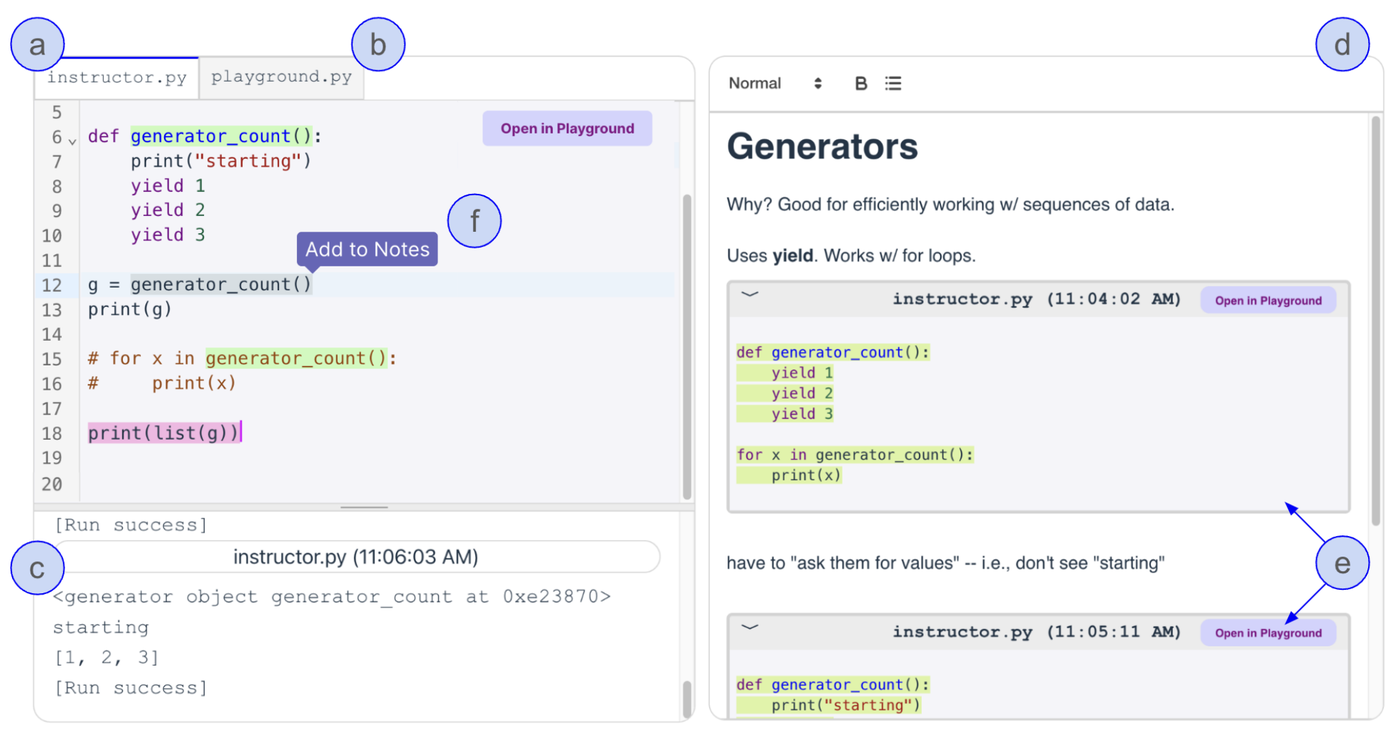
From these insights they built a note-taking tool. The instructor’s code is streamed live to each student in a read-only tab; students take notes in a rich-text editor and can insert a snapshot of the instructor’s code with one click; a separate “playground” lets them run and modify any snippet. They then ran a within-subjects lab study with 57 students, who followed two 15-minute lectures (on Python generators and decorators), one with the new tool and one with a plain code editor where they typed along.
What they found
- Lower workload. With the new tool, NASA-TLX scores were lower on every dimension, with the largest differences in time pressure, effort and frustration. 91% of participants felt they kept up with the lecture, against 39% with the code editor.
- Better notes. Notes captured almost twice as many of the ideas spoken in the lecture (12.6 vs 6.9 “idea units”), more code was labelled with an explanation, and copying errors almost disappeared.
- No learning gain. Quiz scores were the same in both conditions, both right after the lecture and one week later.
My reading
The paper convincingly shows that students prefer not having to transcribe code and that they produce richer notes when they don’t. The step from there to learning is where I would be cautious, in both directions.
The null result on learning is not strong evidence of no effect. The sample was sized to detect differences in general, not small learning effects; the quizzes were short (six or seven items) and scores sat around 7.5 out of 10 in both conditions, leaving little room to separate them. The two topics also differed in difficulty, which adds noise to a within-subjects comparison of only two lectures.
Fifteen scripted minutes are not a lecture. The authors themselves suggest that the extra load of typing may simply not have been enough to overwhelm working memory in such a short session. In a real 90-minute class, with questions, digressions and a faster pace, the balance could look very different.
Three changes were tested at once. One-click copying, a rich-text editor and a clear visual separation between code and prose all came together. We cannot tell which of them produced the better notes. The “idea units” measure also naturally favours an interface built for writing prose over a code editor where explanations must be squeezed into comments.
Self-reports deserve some caution. Each participant saw both interfaces, the new one was obviously the novel one, and the lecturer was also its designer. Part of the preference may be novelty and enthusiasm rather than a lasting benefit.
The value of notes was only half tested. Notes help in two ways: writing them (encoding) and studying them later (storage). Students were allowed to use their notes during the take-home quiz, but they were never given time to review them, which is where better notes should pay off most.
Removing friction is not always neutral. The instructors interviewed believed that typing helps memory and that the errors students make while copying are learning opportunities. The authors suggest moving that practice to dedicated in-class exercises, which is sensible but untested. When copying becomes effortless, there is a risk of students becoming spectators who feel they understand because their notes look complete. With generative AI, copying code is already frictionless for our students; as I argued in a previous post, the real question is no longer how they get the code, but whether they can explain what it does and check that it is right. Seen this way, a tool that frees students from transcribing so they can write down why the code works is a step in the right direction, provided they actually do it.
The research this study opens up
- A semester in a real classroom. Deploy the tool in a course, link usage logs (snapshots taken, playground runs, notes revisited before exams) to exam results, and give students a real reason to study their notes.
- Take the intervention apart. A factorial design (copying vs typing, rich text vs code editor) would show which ingredient matters, and whether the visual separation alone nudges students to write more explanations.
- Longer, faster lectures and different learners. Vary lecture length and pace to see when typing along starts to hurt, and look at who benefits most: novices versus experienced students, students with lower working memory, non-native speakers, and students with disabilities for whom typing at speed is hardest.
- From capturing to explaining. Prompt students to add a short “what does this do and why” to each snapshot, a form of self-explanation, and compare it with notes or summaries generated by an AI assistant. Do AI-written notes help, or do they hollow out the encoding benefit of note-taking?
- Capture the process, not only the product. Instructors complained that the final code hides how it was built. Snapshots could become a timeline of the code’s evolution, with differences between versions, so students can replay the reasoning rather than just the result.
- Make note-taking social. In our own work on programming classes, students regulated their learning not only individually but also with peers (Goswami et al., CSCW 2023). Shared class notes, where students see each other’s snapshots, comments and open questions, could support exactly this kind of co-regulation.
- Beyond the lecture. The same “snapshot and explain” pattern could help students review code produced by an AI assistant, turning a passive copy-paste into an act of verification.
The tool is open source, which makes it easy to build on. My main take-away for teaching is modest but practical: giving students the instructor’s code instead of asking them to retype it makes live coding less stressful and their notes better, and it does not seem to cost anything in learning. Whether it can actually improve learning is the question the next studies need to answer.
Paper (open access): Manesh, D., Wu, T., Chen, Y., & Lee, S. W. (2025). Understanding and improving student note-taking in live coding lectures. In Proceedings of the 2025 ACM Conference on International Computing Education Research V.1 (ICER 2025). ACM. https://doi.org/10.1145/3702652.3744224